
Surph.AI

Unleash the Power of AI Agents

Accelerate your development workflow with intelligent AI agents that write, review, and optimize your code.
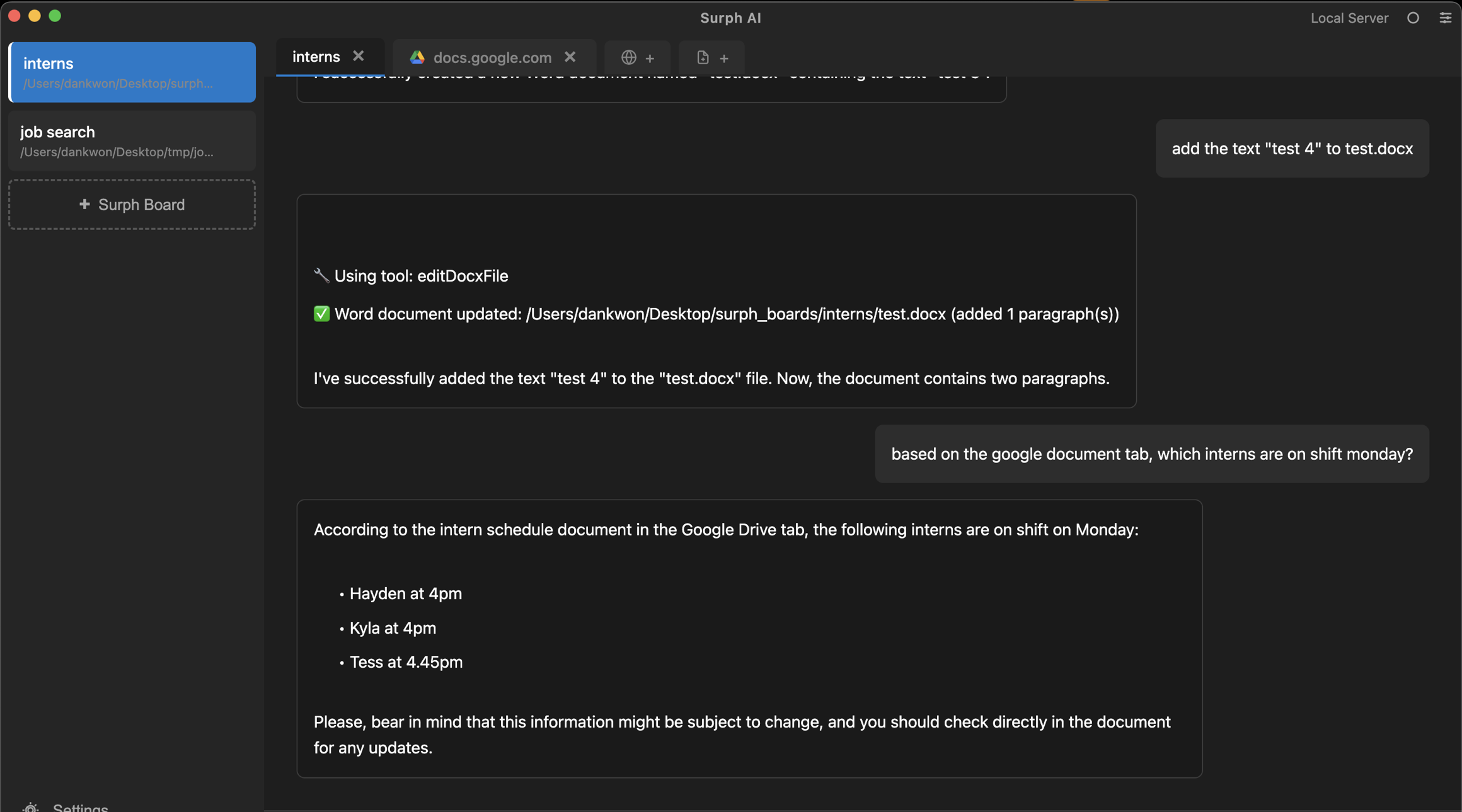
Dashboard preview

Your Browser, Enhanced with AI

Combine your browser tabs and local files as context for AI-powered assistance. Browse, code, and create with intelligent context awareness.

Browser tabs as context
Your open tabs become context for intelligent AI assistance.

interns
docs.google.com
Tab content area

Native LLM chat
Chat with AI directly in your browser with full context awareness.

add the text "test 4" to test.docx

Using tool: editDocxFile

Word document updated: /Users/dankwon/Desktop/surph_boards/interns/test.docx (added 1 paragraph(s))

Local file integration
Select local files to use as context for creating and modifying code.

Browse and edit files
Navigate your file system and edit files with AI assistance.

Context-aware assistance
Combine web content and local files for smarter AI responses.

Combining context sources
🌐docs.google.com
📄components/header.tsx
Using both for context

AI can now reference both web tabs and local files for smarter responses

File creation from context
Create new files using your tabs and existing files as reference.

Surph.AI's context-aware chat transformed my workflow. Browser tabs and files as context make AI assistance incredibly powerful and relevant.
Dan Kwon avatar
Dan Kwon
Lead Engineer, Vertex Labs

Frequently Asked Questions

Everything you need to know about Surph.AI and how it can enhance your browsing and coding experience

What is Surph.AI and who is it for?
Surph.AI is a desktop browser with native LLM chat that uses your open tabs and selected local files as context. It's perfect for developers, creators, and professionals who want AI assistance while browsing the web and working with their local files.
How does Surph.AI use browser tabs as context?
Surph.AI automatically reads the content of your open browser tabs and uses that information as context for the AI chat. This allows the AI to understand what you're viewing and provide more relevant assistance based on the web content you have open.
Can I use local files as context with Surph.AI?
Yes! You can select local files from your computer, and Surph.AI will use them as context in the chat. This allows you to ask the AI to create or modify files based on your existing codebase, documentation, or any other files you select.
What's included in the free plan?
The free plan includes access to the browser with native LLM chat, the ability to use browser tabs as context, file browsing and selection, and basic file editing capabilities. Perfect for getting started with AI-powered browsing and coding.
How do I create and modify files with Surph.AI?
You can browse your file system directly in Surph.AI, select files to use as context, and then ask the AI chat to create or modify files. The AI uses both your open browser tabs and selected local files to understand what you need and generate or edit files accordingly.
Is my data secure with Surph.AI?
Absolutely. Surph.AI runs locally on your machine and processes your files and browser tabs securely. Your data stays on your computer, and we use enterprise-grade security measures to ensure your privacy and data protection.

Browse, Code, Create

Experience a new way of working with Surph.AI. Use your browser tabs and local files as context for AI-powered assistance that helps you code faster and smarter.